NewPay
DEVELOPER DOCUMENTATION

Developer Documentation

Merchants, platform developer docs. NewPay Online payments, Code scanning, refund, Order Query, callback, Signature verification Business codedescription

No matching content found. Try searching an API name, field name or business keyword.

Integration Overview

After merchant onboarding is approved, NewPay provides application-level and merchant-level integration information. Complete API requests, signing, signature verification, order status queries and callback handling on the server side.

Integration Process
  1. 1
    Obtain integration materials
    appId, merchantId / mchId, merchant platform. Used for request signatures, responses or callbacks
  2. 2
    payment scenarios
    Choose online checkout, H5 payment, WeChat mini-program payment, NewPay App payment or in-store reverse-scan acceptance according to the business scenario.
  3. 3
    Integrate core APIs
    Unified order creation, Order Query, refund, Refund Query Callback notifications
  4. 4
    Pre-launch joint testing
    Go live only after completing signature verification, callback idempotency, fallback order status queries and exception handling.

V2 API

V2 is the currently recommended API group. All APIs use JSON requests, with core fields including appId, mchId, order number, amount, currency and sign.

Recommended APIs

Unified order creation

POST

https://prod-openapi-v2.newpay.la/beta/pay/unifiedOrder

Used to obtain checkout URLs or payment reference information. After receiving payReference, merchants can guide users into the corresponding payment flow.

appIdmchIdmchOrderNochannelcurrencyorderAmtcallBackUrlsign

Query Order

POST

https://prod-openapi-v2.newpay.la/beta/pay/uniQueryPay

Used to query payment order status. At least one of newpayOrderNo and mchOrderNo must be provided, and this is recommended as a fallback query after callbacks.

appIdmchIdnewpayOrderNomchOrderNosign

Initiate refund

POST

https://prod-openapi-v2.newpay.la/beta/pay/uniRefund

Initiate refunds for paid orders. Submit the NewPay payment order number, merchant refund number, refund amount and signature.

appIdmchIdnewpayOrderNomchRefundNorefundAmtcallbacksign

Query Refund

POST

https://prod-openapi-v2.newpay.la/beta/pay/uniQueryRefund

Used to query refunds. newpayRefundNo or mchRefundNo

appIdmchIdnewpayRefundNomchRefundNosign

Query User Information

POST

https://prod-openapi-v2.newpay.la/beta/mch/queryUserInfoByToken

Query NewPay user information through a user token, for business scenarios that need user identity synchronization.

appIdtimestamptokensign

refundcallback

POST

Merchants orrefund callBackUrl / callback

NewPay notifies the merchant server of payment or refund results. Merchants must verify the signature and process idempotently by order number.

payStatusorderTypenewpayOrderNomchOrderNosettlementStatussign

in-storeCode scanning

For traditional in-store merchants. After cashier equipment reads the user's payment code, the merchant server creates an acceptance order and confirms the result through callbacks and queries.

In-store merchants

Create reverse-scan order

POST

https://prod-openapi-v2.newpay.la/beta/codeScanner/createOrder

User payment code authCode, order amount, currency, merchant order number callbackaddress, NewPay Order number, order status

appIdmchIdauthCodeamountcurrencymchOrderNocallbackUrlsign

NewPay H5 Payment Integration

H5 scenarios require user identity synchronization, order construction, payUrl retrieval, native payment page invocation and final order status query after the user returns.

H5 Integration
  1. 1
    User identity synchronization
    business userToken / userId NewPay Users
  2. 2
    Create order Get payUrl
    Unified order creationAPI, NewPay address
  3. 3
    Invoke payment page
    Open the native payment module through the protocol specified by NewPay and pass in redirectUrl.
  4. 4
    query status
    After the user returns to the merchant page, the merchant system should query order status and handle SUCCESS, PENDING, FAIL or CANCEL.

signature, callback

All production APIs should complete signing and signature verification on the server side. The sign field is excluded from the string to be signed; non-empty fields are sorted lexicographically, concatenated and signed with SHA256withRSA.

Security and signature verification
ItemRuleRecommendation
requestsignatureSort non-empty parameters lexicographically, concatenate them as param1=val1&param2=val2, then sign with the merchant private key.Complete this on the server side and do not expose the private key.
Response signature verificationRule responsefield, Use NewPay platformbusinessorder
Payment callbackcallback payStatus, orderType, amount, Order number, signmchOrderNo / newpayOrderNo
refundcallbackrefund callback addressRecommendation Refund QueryAPI

Business code order status

API responses include success, message, code, timestamp and data. Order status fields are used to determine business results such as payment, refunds and timeouts.

Business code
Status valueMeaningBusiness handling recommendation
0createThe order has been created and is waiting for payment.
1payingPayment is processing; polling query is available.
3successSuccess, flow
4 / 5 / 6refunding / partial refund / refundedRefunding, Partially refundedorRefunded.
7 / 8 / 9 / 10cancel / expired / cancelled / failedorderCancel, orFailed, Users

API Catalog and Interface Index

Cover V1 deprecated APIs, WeChat Pay APIs, common APIs, payment capabilities, signature verification, business codes and contact information for easier modular lookup by partners.

API Index

Basic Chapters

What NewPay is, the integration process and payment capabilities, covering NewPay overview, application flow, website payment and app payment capabilities.

appIdmerchantIdprivateKeypublicKey

V1 API ( )

POST

/api/open/converge/pay/v1/createOrder

V1 aggregated payment API for website and mobile createOrder. V2 is recommended.

payMethodorderAmtorderNocallBackUrlpayUrl

WeChat Pay APIs

POST

/api/open/converge/pay/v2/createOpenMini
/api/open/converge/pay/v2/getMiniPayment

Cover WeChat mini-program order creation, payment information retrieval, flowcharts and examples. Laos scenarios are subject to WeChat official limitations and require mini-program capabilities.

envVersionwxCodeprepay_idwx.requestPayment

Common APIs

POST

Common APIs include payment queries, refunds, refund queries, prepayment, user queries, transfers, transfer order queries and order confirmation.

Inquiry PaymentRefundPre PaymentTransferOrder Confirmation

NewPay API documentation

Provide partners with complete API references, including API paths, field descriptions, tables, code examples, flow diagrams and business codes for development, joint testing and launch checks.

API documentation

1. What is NewPay

NewPay is a compliant payment and cross-border acquiring service platform for the Laos market. It provides merchants, platforms and institutional partners with QR payments, online checkout, cross-border wallet acceptance, transaction management, settlement reconciliation, refunds and risk-compliance services.

  • Merchants, platform institutionPartners, NewPay Unified Integrationlocal cross-borderPayment Methods
  • The Developer Documentation focuses on technical guidance for payment integration, orders, refunds, callbacks, signature verification and business codes.
  • Descriptions unrelated to the current payment business have been removed from this page.
NewPay platform

2. Integration process

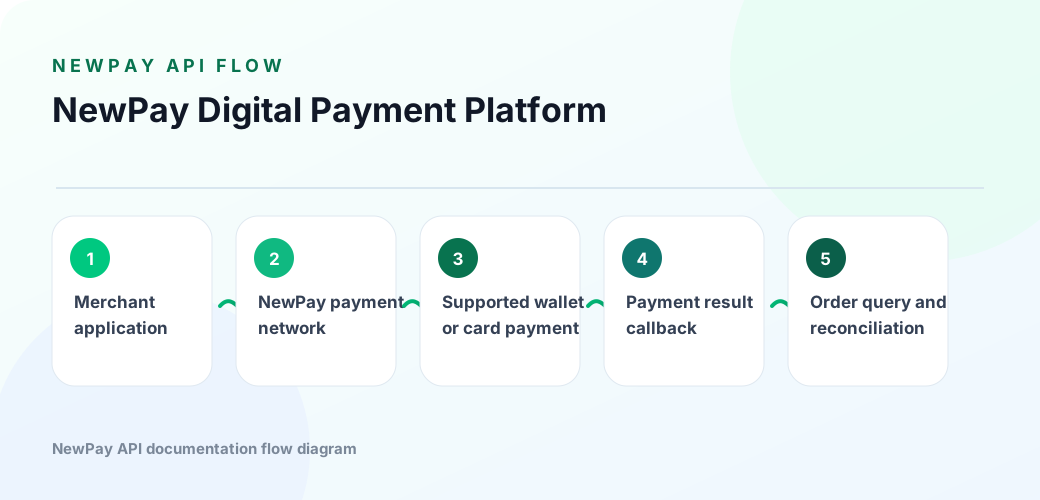
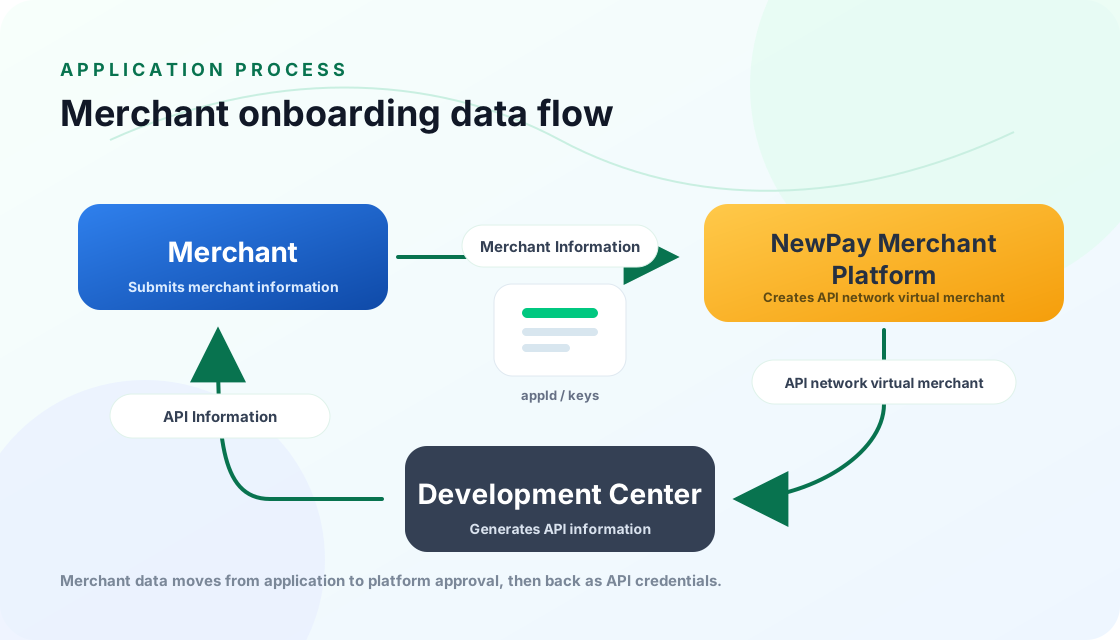
1. Overview

NewPay API Integration Process

2. description

Merchant application materials for the NewPay merchant platform.

NewPay merchant platform materials and merchant API information.

developer API Merchants materials, Merchants

3. API materials

Namedescription
appIdMerchants Application ID
merchantIdMerchants ID
privateKeyUsed for requestParameters signature Merchants
publicKeyUsed for Response message signature platform

3. payment capabilities

1. Overview

To support websites, mobile apps, merchant platforms and offline payment scenarios, NewPay provides the following payment capabilities for faster merchant integration.

2. description

2.1 payment capabilities

Payment MethodsUse CasesPayment toolPayment currency
NewPayMerchants can use NewPay payment capabilities, while users pay with the NewPay App or merchant QR codes.QR codeLAK
MasterCardMerchants MasterCard payment capabilities, Users MasterCardMasterCardUSD

2.2 App payment capabilities

Payment MethodsUse CasesPayment toolPayment currency
NewPayMerchant apps can use NewPay payment capabilities, while users pay with the NewPay App.NewPay APPLAK
MasterCardMerchants App MasterCard payment capabilities, Users MasterCard H5MasterCardUSD

3. Website payment flow

1. Overview

Used for merchants PC payment scenarios

2. Payment flow

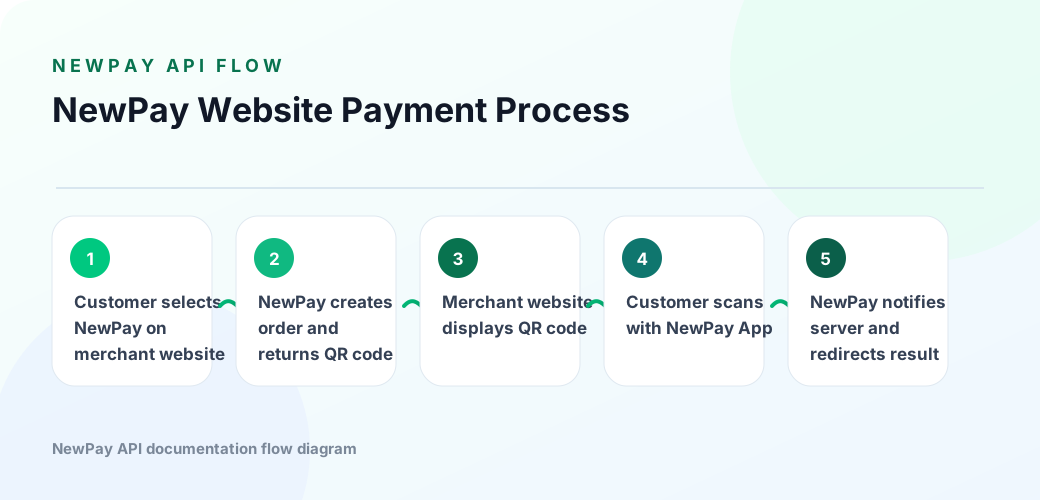
2.1 NewPay flow
NewPay Flowchart
  1. Merchants (MWA) NewPay Payment Methods
  1. NewPay platform order, orderQR code
  1. MWA QR code, Use NewPay App QR payment
  1. After payment is completed, the NewPay platform notifies the MWA server of the transaction result and redirects to the transaction result page URL.
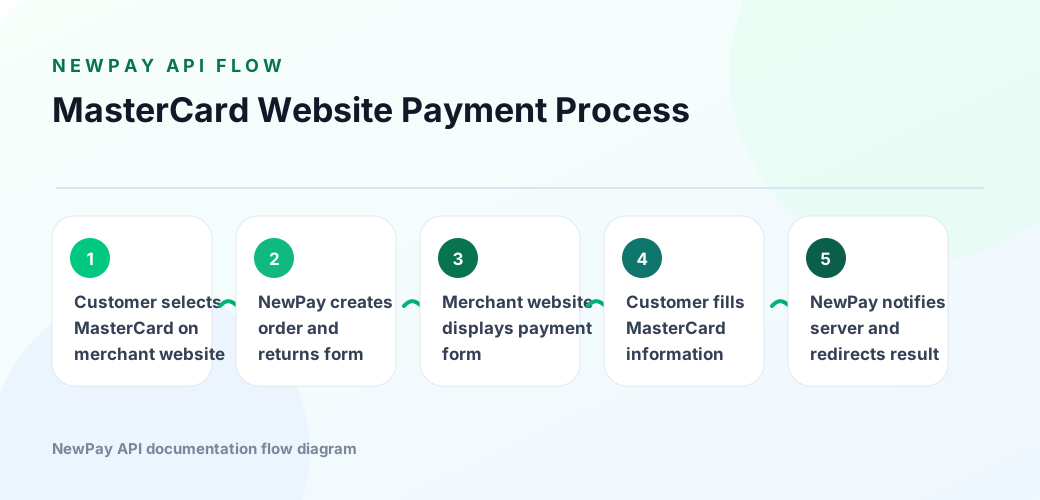
2.2 MasterCard flow
MasterCard Flowchart
  1. Merchants (MWA) MasterCard Payment Methods
  1. NewPay platform order, MasterCard URL
  1. MWA displays the payment form page, where the customer enters MasterCard information.
  1. After payment is completed, the NewPay platform notifies the MWA server of the transaction result and redirects to the transaction result page URL.

4. App flow

1. Overview

Used forMerchantsmobile App payment scenarios

2. Payment flow

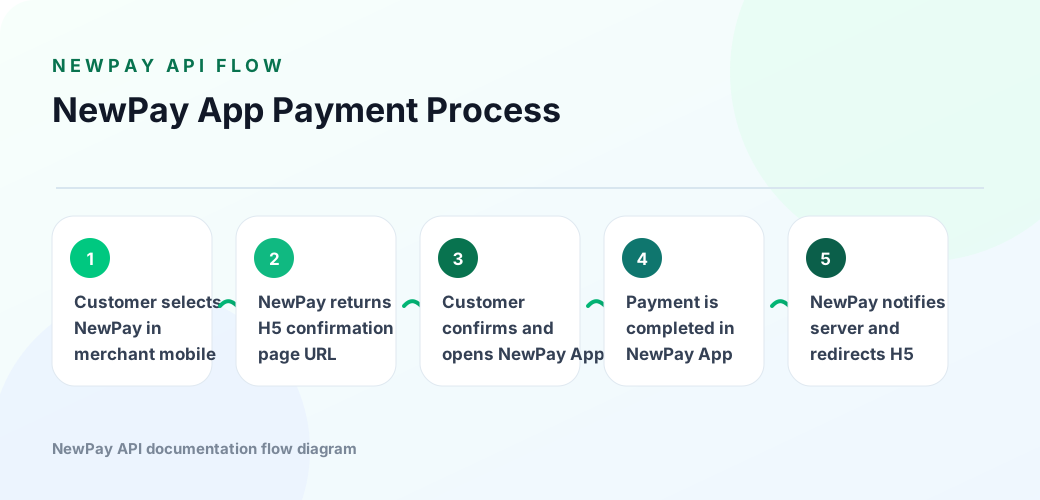
2.1 NewPay flow
NewPay App Flowchart
  1. Merchant mobile app (MMA) NewPay payment methods
  1. NewPay platform order, Used for order H5 URL
  1. Open NewPay App
  1. After payment is completed, the NewPay platform notifies the MMA server of the transaction result and redirects to the transaction result H5 page URL.
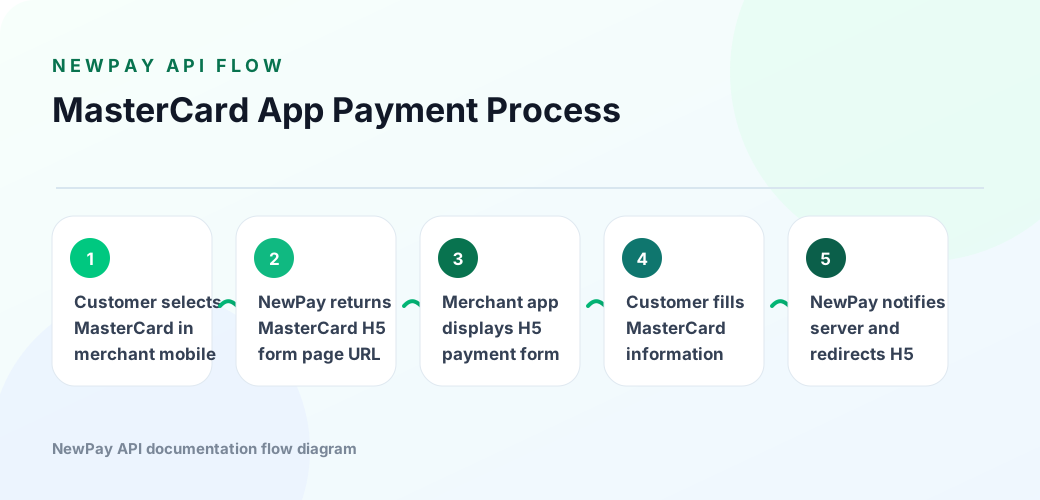
2.2 MasterCard flow
MasterCard App Flowchart
  1. Merchant mobile app (MMA) MasterCard payment methods
  1. NewPay platform order, MasterCard URL
  1. MMA displays the MasterCard H5 payment form page, where the customer enters MasterCard information.
  1. After payment is completed, the NewPay platform notifies the MWA server of the transaction result and redirects to the transaction result H5 page URL.

4. V1 API ( )

4.1. Converge Payment API

Converge Payment supports WeChat Pay mini program scenarios. 4.2. WeChat Pay API

1. Overview

Use this API to obtain the checkout page URL. After obtaining it, redirect the user to the checkout page to complete payment.

2. requestdescription

  • Method: post
  • API path
HTML
For Website: https://prod-openapi.newpay.la/api/open/converge/pay/v1/createOrder
For Mobile: https://prod-openapi.newpay.la/api/open/converge/pay/v1/m/createOrder

2.1 request

KeyValue
Content-Typeapplication/json
version1.0

2.2 requestParameters

NamedescriptionTypeRequired
appIdUnique identifier of the third-party application platformstringtrue
merchantIdUnique identifier of the third-party merchantstringtrue
timestamprequest timestamptimestamptrue
signData signaturestringtrue
payMethodPayment Methods: 1.NewPay; 3.VISA; 5 WeChat; 6 Alipayinttrue
currencyPayment currency, LAK/USDstringtrue
orderAmtPayment amountstringtrue
orderNoOrder number assigned by the merchant to identify one payment request.stringtrue
callBackUrlpayment result URLstringtrue
successPageUrlSuccess addressstringtrue
failurePageUrlFailed addressstringtrue
cancelPageUrlRedirect URL after payment cancellationstringtrue
subjectProduct title,required when using Alipay.stringfalse
extraorder fieldUse Alipay, ANDROID or IOSstringfalse

2.3 response

NamedescriptionType
successSuccess: true/falseboolean
messageResponse messagestring
codeResponse codestring
timestampresponse timestamplong
dataResult objectobject
> appIdUnique identifier of the third-party application platformstring
> signData signaturestring
> tranAbbrtransactionTypestring
> tranNotransactionstring
> orderAmtPayment amountstring
> payUrlPayment addressstring
> orderNoOrder numberstring
> newpayOrderNoNewPay Order numberstring

3. Example

3.1 requestExample

json
{
    "appId": "3514d69403bc4ce1a8fafb6415a31018",
    "timestamp": {{current_timestamp}},
    "sign": "{{sign}}",
    "payMethod": 1,
    "extra": "",
    "currency": "LAK",
    "orderAmt": 50000,
    "merchantId": "876266cdc7154dd08a022fd1f2eace55",
    "orderNo": "ORDERNO000000000A104",
    "subject": "name002",
    "callBackUrl": "www.1231123.com",
    "successPageUrl": "https://prod.newpay.la:8071/jdb/success.html",
    "failurePageUrl": "https://prod.newpay.la:8071/jdb/failure.html",
    "cancelPageUrl": "https://prod.newpay.la:8071/jdb/cancel.html"
}

3.2 responseExample

json
{
    "success": true,
    "message": "success",
    "data": {
        "appId": "3514d69403bc4ce1a8fafb6415a31018",
        "sign": "ALa4W6EDAKpZGEuCfpmemOA346bZw6CGrbsy6Xo6J2wYLOldSUrUVyEI0DLpZmHU9tIVp4gi/DENq3rj/nZtXn9grXWhLbX4G+IMEVb3TKEIwTDWZ++I1OfgtuUxOHof711p6A4ga95Xm645Qly/HV8YHoogI7SOw/w352TElhw37o/pIKsSWfeTpXtpfjRs3o69x4EVpDQ0DmYW5zVBCEriBqHvLqjbacOl3HGTa93oALbgQKa5ftAENBOmxi1zNxCOsY+Ecq4apK3tdma1RL+AmrBgmQu8O2vEIWBmlSxg1CY1ZUw2IHixV8D2HHHAn7RQjoDDFePelyB+CLS3GA==",
        "tranAbbr": "FP1005",
        "tranNo": "00012022090700000015",
        "orderAmt": "50000",
        "payUrl": "http://192.168.10.105:8072/BECLPay/page.html?orderNo=202209076000000321",
        "orderNo": "ORDERNO000000000A104",
        "newpayOrderNo": "202209076000000321"
    },
    "code": "0",
    "timestamp": "1662521235625"
}

4. NewPay App

orderresponse payUrl fieldUse AppLink NewPay

4.1 iOS

objective-c Example:

objective-c
[[UIApplication sharedApplication] openURL:[NSURL URLWithString:response.data.payUrl] options:@{} completionHandler:nil];

swift Example:

swift
let url = URL(string: response.data.payUrl)!
UIApplication.shared.open(url, options: [:], completionHandler: nil)

4.2 Android

Java Example:

java
String payUrl= response.getData().getPayUrl();
Intent intent = new Intent(Intent.ACTION_VIEW, Uri.parse(payUrl));
startActivity(intent);

Kotlin Example:

java
val payUrl = response?.data?.payUrl!!;
val intent = Intent(Intent.ACTION_VIEW, Uri.parse(payUrl))
startActivity(intent)

4.2.2 Create Order

1. Overview

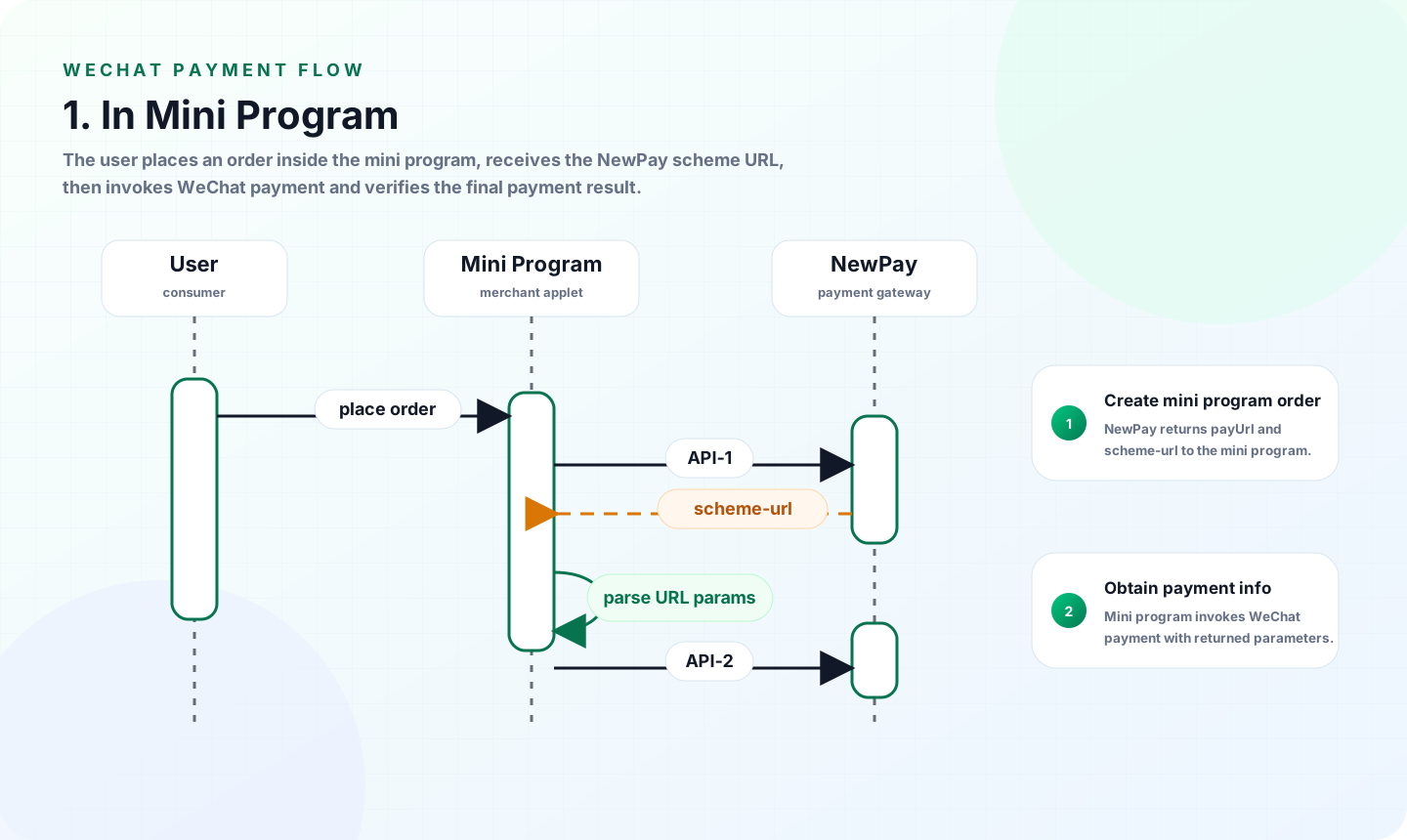
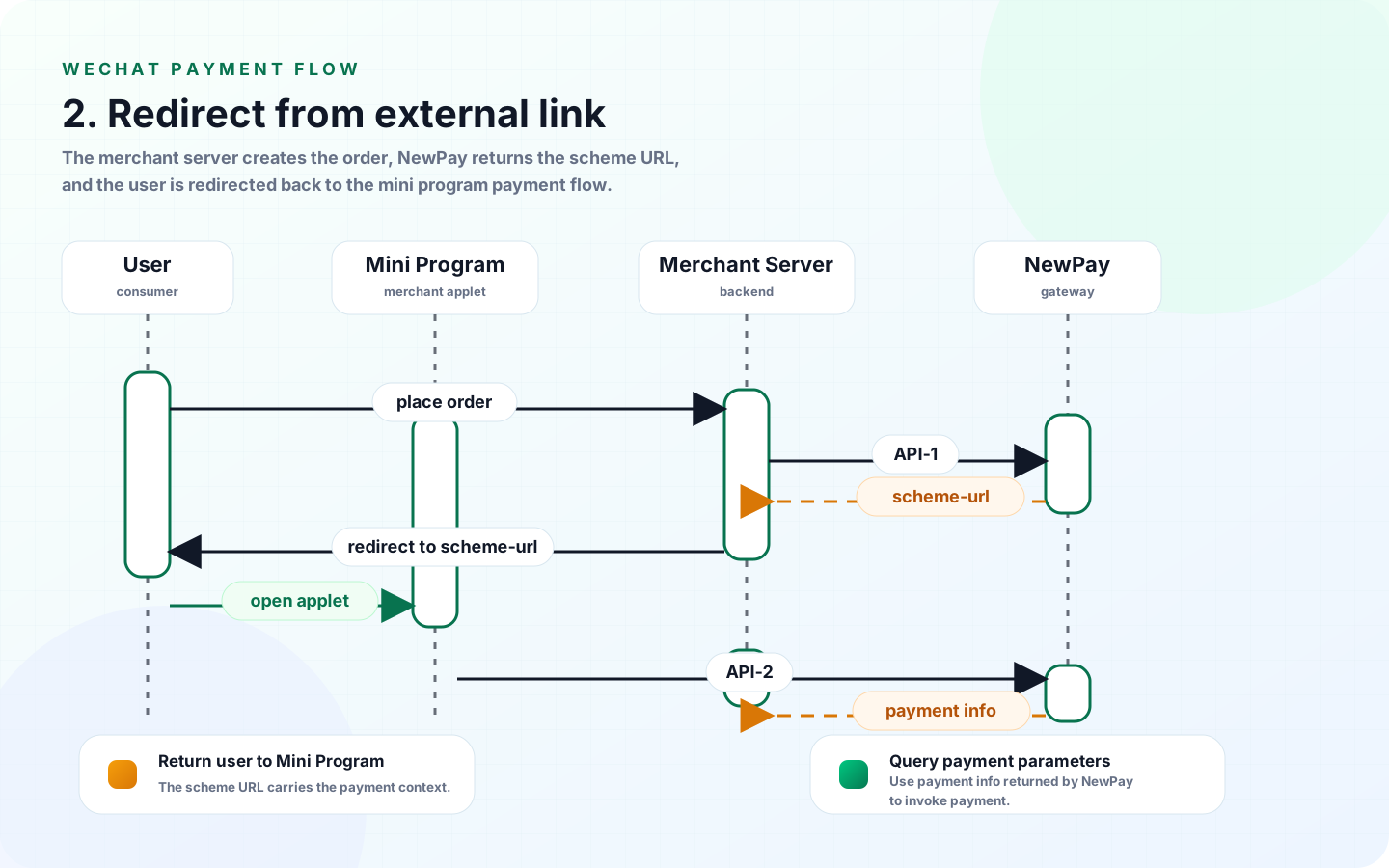
API WeChat Pay Mini program

2. requestdescription

  • Method: post
  • API path: https://prod-openapi.newpay.la/api/open/converge/pay/v2/createOpenMini

2.1 request

KeyValue
Content-Typeapplication/json
version1.0

2.2 requestParameters

NamedescriptionTypeRequired
appIdUnique identifier of the third-party application platformStringtrue
timestamprequest timestampLongtrue
currencyPayment currency, LAK/USDStringtrue
orderAmtPayment amount. USD supports two decimal places; LAK is an integer.Stringtrue
merchantIdUnique identifier of the third-party merchantStringtrue
orderNoOrder number assigned by the merchant to identify one payment request.Stringtrue
subjectProduct titleStringfalse
callBackUrlpayment result URLStringtrue
envVersionMini program version: release / trial. Note: the trial version is only supported outside the WeChat environment.
Trial redirect tool:http://47.108.185.11:19000/
Stringfalse
signData signatureStringtrue

3. response

NamedescriptionType
successSuccess: true/falseboolean
messageResponse messagestring
codeResponse codestring
timestampresponse timestamplong
dataResult objectobject
> appIdUnique identifier of the third-party application platformstring
> signData signaturestring
> currencyPayment currency, LAK/USDstring
> tranAbbrtransactionTypestring
> tranNotransactionstring
> orderAmtPayment amountstring
> payUrlPayment addressstring
> orderNoOrder numberstring
> newpayOrderNoNewPay Order numberstring

4.2.3 Get payment information

1. Overview

Use this API to obtain payment information, then call wx.requestPayment(OBJECT), WeChat Paydocs

2. requestdescription

  • Method: post
  • API path: https://prod-openapi.newpay.la/api/open/converge/pay/v2/getMiniPayment

2.1 request

KeyValue
Content-Typeapplication/json
version1.0

2.2 requestParameters

NamedescriptionTypeRequired
codeObtained during mini-program login; refer to this documentStringtrue
newpayOrderNoNewPay Order number, scheme-url GetLongtrue
timestamprequest timestampLongtrue

3. response

NamedescriptionType
successSuccess: true/falseboolean
messageResponse messagestring
codeResponse codestring
timestampresponse timestamplong
dataResult objectobject
> appIdUnique identifier of the third-party application platformstring
> paySignWeChat Pay signature this documentstring
> signTypeDefault RSAstring
> nonceStrRandom stringstring
> packageParameters, prepay_id=wx201410272009395522657a690389285100string

4.2.4 Example

jsx
// parse the orderNo from url
App({
  paymentData:{
    orderNo:null
  },
  onShow: function (options) {
    // Parse parameters from the scheme URL: {orderNo: "202508251000251204"}
    console.log('Launch parameters:', options.query);
    if (options && options.query) {
        Object.assign(this.paymentData, options.query);
    }
  }
})

// awake the wechat cashier to pay
const cashier = function (param) {
    wx.requestPayment({
        "timeStamp": param.timeStamp,
        "nonceStr": param.nonceStr,
        "package": param.package,
        "signType": param.signType,
        "paySign": param.paySign,
        "success": function (res) {
            //Route to the success page
        },
        "fail": function (res) {
            //Route to the failure page
        },
        "complete": function (res) {}
    })
}

// Obtain payment info 
const payment = function(orderNo){
    wx.login({
        success: res => {
            wx.request({
                url: 'http://192.168.0.20:8181/api/open/converge/pay/v2/getMiniPayment',
                method: 'POST',
                data: {
                    code: res.code,
                    newpayOrderNo: orderNo,
                    timestamp: Date.now()
                },
                header: {
                    'content-type': 'application/json;charset=UTF-8'
                },
                success(res) {
                    console.log(res.data);
                    if(res.data.code !== '0'){
                        wx.showToast({
                            title: res.data.message,
                            icon: 'none', 
                            duration: 3000
                          });
                        return;  
                    }
                    cashier(res.data.data.resMap)
                },
                fail(err) {
                    console.error('Request failed:', err);
                }
            });
        }
    });
}

Page({
    data: {
        message: '',
    },
    onReady() {
        // step 1: parse orderNo from url
        const app = getApp();
        const orderNo = app.paymentData.orderNo;
        console.log(orderNo);
        if(orderNo){
            // step2: payment
            // step2.1: wx.login to get the code
            // step2.2: obtain payment info
            // step2.3: awake cashier to pay
            payment(orderNo);
        }
    },
})

4.3.1 Query Payment

1. Overview

Use this API to query the transaction status and related information of a submitted payment request.

2. requestdescription

  • Method: post
  • API path: https://prod-openapi.newpay.la/api/open/converge/pay/v1/get

2.1 request

KeyValue
Content-Typeapplication/json
version1.0

2.2 requestParameters

NamedescriptionTypeRequired
appIdUnique identifier of the third-party application platformstringtrue
merchantIdUnique identifier of the third-party merchantstringtrue
timestamprequest timestamptimestamptrue
signData signaturestringtrue
orderNoOrder numberstringtrue

2.3 response

NamedescriptionType
successSuccess: true/falseboolean
messageResponse messagestring
codeResponse codestring
timestampresponse timestamplong
dataResult objectobject
> appIdUnique identifier of the third-party application platformstring
> signData signaturestring
> tranAbbrtransactionTypestring
> tranNotransactionstring
> transStatusTransaction status: 1-success; 0-failure; 2-processingint
> transInfoFailure reasonstring
> payMethodPayment Methods: 1.NewPay; 4.MasterCard;int
> extraorder fieldstring
> orderNoOrder numberstring
> newpayOrderNoNewPay Order numberstring
> currencyPayment currency, LAK/USDstring
> orderAmtPayment amountstring
> subjectProduct titlestring
> settlementStatussettlement status: 1- settlement; 2- settlementint

3. Example

3.1 requestExample

json
{
    "appId": "3514d69403bc4ce1a8fafb6415a31018",
    "timestamp": {{current_timestamp}},
    "sign": "{{sign}}",
    "merchantId": "876266cdc7154dd08a022fd1f2eace55",
    "orderNo": "ORDERNO000000000A104"
}

3.2 responseExample

json
{
    "success": true,
    "message": "success",
    "data": {
        "appId": "3514d69403bc4ce1a8fafb6415a31018",
        "sign": "OUUz/cvUfo4m3IcndGByEKjT/pUOSyf0qhMV+lbKdilMxZgErjmTrB6xYmvMvhJpQFcRbGJFsn9B1WxNi330K1gY5ANXD2ttEIqV0IROm3M/o43rMu1tjVLk5ZBMP2D2l28zsYh9tyX8Zd8CzIxw10YT8Hkgvbh3bTP/vsRv1xov/YzOhpWsvSgDIJb6eKg02BePfR8N6wLkE9FV+91JDxFvFIMCc6qR7GXEFCnrilTeas95SGcSADS2KBFSXHdP6IOjnQbQEgVoAzyLhq4pjh6DrNupduknOKagB9CEKB1yEnb/zs+/WRFfP3VgBj0MIUideXEAvVJzp4CoZ5q7cA==",
        "tranAbbr": "FP1003",
        "tranNo": "00012022090700000033",
        "transStatus": 0,
        "transInfo": "Transaction Success",
        "payMethod": 1,
        "extra": "",
        "orderNo": "ORDERNO000000000A104",
        "newpayOrderNo": "202209076000000321",
        "currency": "LAK",
        "orderAmt": "50000",
        "subject": "name002",
        "settlementStatus": 1
    },
    "code": "0",
    "timestamp": "1662528566437"
}

4.3.2 Refund

1. Overview

API Success orderInitiate refund. refundFull or partial refundtransaction refund, refund amount transactionamount. refundrequest refund

2. requestdescription

  • Method: post
  • API path: https://prod-openapi.newpay.la/api/open/converge/pay/v1/refund

2.1 request

KeyValue
Content-Typeapplication/json
version1.0

2.2 requestParameters

NamedescriptionTypeRequired
appIdUnique identifier of the third-party application platformstringtrue
merchantIdUnique identifier of the third-party merchantstringtrue
timestamprequest timestamptimestamptrue
signData signaturestringtrue
refundOrderAmtrefund amountstringtrue
orderNoOrder numberstringtrue
refundOrderNorefundOrder numberstringtrue
refundDescRefund reasonstringtrue
callBackUrlrefundcallbackaddressstringtrue

2.3 response

NamedescriptionType
successSuccess: true/falseboolean
messageResponse messagestring
codeResponse codestring
timestampresponse timestamplong
dataResult objectobject
> appIdUnique identifier of the third-party application platformstring
> signData signaturestring
> tranStatusTransaction status: 1-success; 0-failureint
> tranInfotransactionstring
> refundOrderAmtrefund amountstring
> payMethodPayment Methods: 1.NewPay; 4.MasterCard;int
> currencyPayment currency, LAK/USDstring
> orderNoOrder numberstring
> refundOrderNorefundOrder numberstring
> newpayRefundOrderNoNewPay refundOrder numberstring

3. Example

3.1 requestExample

json
{
    "appId": "3514d69403bc4ce1a8fafb6415a31018",
    "timestamp": {{current_timestamp}},
    "sign": "{{sign}}",
    "refundOrderAmt": 50000,
    "merchantId": "876266cdc7154dd08a022fd1f2eace55",
    "orderNo": "ORDERNO000000000A104",
    "refundOrderNo": "ORDERNORFD000000000A104",
    "refundDesc": "reason",
    "callBackUrl": "www.google.com"
}

3.2 responseExample

json
{
    "success": true,
    "message": "success",
    "data": null,
    "code": "0",
    "timestamp": "1662528697925"
}

4.3.3 Query Refund

1. Overview

API query refundrequest refund status

2. requestdescription

  • Method: post
  • API path: https://prod-openapi.newpay.la/api/open/converge/pay/v1/getRefund

2.1 request

KeyValue
Content-Typeapplication/json
version1.0

2.2 requestParameters

NamedescriptionTypeRequired
appIdUnique identifier of the third-party application platformstringtrue
merchantIdUnique identifier of the third-party merchantstringtrue
timestamprequest timestamptimestamptrue
signData signaturestringtrue
refundOrderNorefundOrder numberstringtrue

2.3 response

NamedescriptionType
successSuccess: true/falseboolean
messageResponse messagestring
codeResponse codestring
timestampresponse timestamplong
dataResult objectobject
> appIdUnique identifier of the third-party application platformstring
> signData signaturestring
> tranAbbrtransactionTypestring
> tranNotransactionstring
> tranStatusTransaction status: 1-success; 0-failureint
> tranInfotransactionstring
> refundOrderAmtrefund amountstring
> payMethodPayment Methods: 1.NewPay; 4.MasterCard;int
> currencyPayment currency, LAK/USDstring
> orderNoOrder numberstring
> newpayOrderNoNewPay Order numberstring
> refundOrderNorefundOrder numberstring
> newpayRefundOrderNoNewPay refundOrder numberstring

3. Example

3.1 requestExample

json
{
    "appId": "3514d69403bc4ce1a8fafb6415a31018",
    "timestamp": {{current_timestamp}},
    "sign": "{{sign}}",
    "refundOrderNo": "ORDERNORFD000000000A104",
    "merchantId": "876266cdc7154dd08a022fd1f2eace55"
}

3.2 responseExample

json
{
    "success": true,
    "message": "success",
    "data": {
        "appId": "3514d69403bc4ce1a8fafb6415a31018",
        "sign": "MOGEIGrrLD4BvZTgxETIIm4m3vfHXECIXbB1nPfOCimfNc1c59h2bccHSuBsXprgGmkGoh4AjCkQBtQ9u0Ui0AOfSmtSJnnYshk7beSdmNzl+CAK0RkrrQfQaauoBLxQa7odhMy7WhFQF7XL+4dLih8RK6kpZPPiBwUNyiC+69sc00I+IuEJfcTUydMPjCl1U3Qq1dS9igGOWrwE5McMAFLPpWTi1B5tbv9FC8SQUtNRPv3ckIUrkC0U0uXKspXG2iPIeM49Jck8ZEwql22yzjvR0bMnVL6TBkysooCGLW/ETFT5+EUWrPkp7pz7AnPt2VT2sVWIpllw/H4zLYpLog==",
        "tranAbbr": null,
        "tranNo": "00012022090700000037",
        "refundSuccess": true,
        "refundOrderAmt": "50000",
        "payMethod": 1,
        "currency": "LAK",
        "orderNo": "ORDERNO000000000A104",
        "newpayOrderNo": "202209076000000321",
        "refundOrderNo": "ORDERNORFD000000000A104",
        "newpayRefundOrderNo": "202209078000000702"
    },
    "code": "0",
    "timestamp": "1662528718641"
}

4.3.4 Prepayment

1. Overview

Use this API to obtain the prepayment checkout page URL. After obtaining it, redirect the user to the checkout page to complete prepayment.

2. requestdescription

  • Method: post
  • API path
text
For Website:  
https://prod-openapi.newpay.la/api/open/converge/pay/v1/createOrderPrePayment
For Mobile:  
https://prod-openapi.newpay.la/api/open/converge/pay/v1/m/createOrderPrePayment

2.1 request

KeyValue
Content-Typeapplication/json
version1.0

2.2 requestParameters

NamedescriptionTypeRequired
appIdUnique identifier of the third-party application platformstringtrue
merchantIdUnique identifier of the third-party merchantstringtrue
timestamprequest timestamptimestamptrue
signData signaturestringtrue
payMethodPayment Methods: 1.NewPay; 4.MasterCard; 5.WeChatinttrue
currencyPayment currency, LAK/USDstringtrue
orderAmtPayment amountstringtrue
orderNoOrder number assigned by the merchant to identify one payment request.stringtrue
callBackUrlpayment result URLstringtrue
successPageUrlSuccess addressstringtrue
failurePageUrlFailed addressstringtrue
cancelPageUrlRedirect URL after payment cancellationstringtrue
subjectProduct titlestringfalse
extraorder fieldstringfalse

2.3 response

NamedescriptionType
successSuccess: true/falseboolean
messageResponse messagestring
codeResponse codestring
timestampresponse timestamplong
dataResult objectobject
> appIdUnique identifier of the third-party application platformstring
> signData signaturestring
> tranAbbrtransactionTypestring
> tranNotransactionstring
> orderAmtPayment amountstring
> payUrlPayment addressstring
> orderNoOrder numberstring
> newpayOrderNoNewPay Order numberstring

3. Example

3.1 requestExample

json
{
    "appId": "3514d69403bc4ce1a8fafb6415a31018",
    "timestamp": {{current_timestamp}},
    "sign": "{{sign}}",
    "payMethod": 1,
    "extra": "",
    "currency": "LAK",
    "orderAmt": 50000,
    "merchantId": "876266cdc7154dd08a022fd1f2eace55",
    "orderNo": "ORDERNO000000000A104",
    "subject": "name002",
    "callBackUrl": "www.1231123.com",
    "successPageUrl": "https://prod.newpay.la:8071/jdb/success.html",
    "failurePageUrl": "https://prod.newpay.la:8071/jdb/failure.html",
    "cancelPageUrl": "https://prod.newpay.la:8071/jdb/cancel.html"
}

3.2 responseExample

json
{
    "success": true,
    "message": "success",
    "data": {
        "appId": "3514d69403bc4ce1a8fafb6415a31018",
        "sign": "ALa4W6EDAKpZGEuCfpmemOA346bZw6CGrbsy6Xo6J2wYLOldSUrUVyEI0DLpZmHU9tIVp4gi/DENq3rj/nZtXn9grXWhLbX4G+IMEVb3TKEIwTDWZ++I1OfgtuUxOHof711p6A4ga95Xm645Qly/HV8YHoogI7SOw/w352TElhw37o/pIKsSWfeTpXtpfjRs3o69x4EVpDQ0DmYW5zVBCEriBqHvLqjbacOl3HGTa93oALbgQKa5ftAENBOmxi1zNxCOsY+Ecq4apK3tdma1RL+AmrBgmQu8O2vEIWBmlSxg1CY1ZUw2IHixV8D2HHHAn7RQjoDDFePelyB+CLS3GA==",
        "tranAbbr": "FP1005",
        "tranNo": "00012022090700000015",
        "orderAmt": "50000",
        "payUrl": "http://192.168.10.105:8072/BECLPay/page.html?orderNo=202209076000000321",
        "orderNo": "ORDERNO000000000A104",
        "newpayOrderNo": "202209076000000321"
    },
    "code": "0",
    "timestamp": "1662521235625"
}

4. NewPay App

orderresponse payUrl fieldUse AppLink NewPay

4.1 iOS

objective-c Example:

objective-c
[[UIApplication sharedApplication] openURL:[NSURL URLWithString:response.data.payUrl] options:@{} completionHandler:nil];

swift Example:

swift
let url = URL(string: response.data.payUrl)!
UIApplication.shared.open(url, options: [:], completionHandler: nil)

4.2 Android

Java Example:

java
String payUrl= response.getData().getPayUrl();
Intent intent = new Intent(Intent.ACTION_VIEW, Uri.parse(payUrl));
startActivity(intent);

Kotlin Example:

java
val payUrl = response?.data?.payUrl!!;
val intent = Intent(Intent.ACTION_VIEW, Uri.parse(payUrl))
startActivity(intent)

4.3.5 Query User

1. Overview

API Get NewPay Users

2. requestdescription

  • Method: post
  • API path: https://prod-openapi.newpay.la/api/open/converge/pay/v1/getOpenUserInfoFor

2.1 request

KeyValue
Content-Typeapplication/json
version1.0

2.2 requestParameters

NamedescriptionTypeRequired
appIdUnique identifier of the third-party application platformstringtrue
merchantIdUnique identifier of the third-party merchantstringtrue
timestamprequest timestamptimestamptrue
signData signaturestringtrue
phoneNoNewPay Usersstringtrue

2.3 response

NamedescriptionType
successSuccess: true/falseboolean
messageResponse messagestring
codeResponse codestring
timestampresponse timestamplong
dataResult objectobject
> appIdUnique identifier of the third-party application platformstring
> signData signaturestring
> tranAbbrtransactionTypestring
> tranNotransactionstring
> userMobileNewPay User mobile numberstring
> userAvatarNewPay Usersstring
> nickNameNewPay User nicknamestring
> userNameNewPay Usersstring
> fundAccountIdNewPay Users IDstring
> areaNewPay User mobile numberstring

3. Example

3.1 requestExample

json
{
    "appId": "3514d69403bc4ce1a8fafb6415a31018",
    "timestamp": 1687494500726,
    "sign": "{{sign}}",
    "phoneNo": "+8562022214944"


}

3.2 responseExample

json
{
    "success": true,
    "message": "success",
    "data": {
        "appId": "5afa28d9dfe94830ad67cd3a61ab8978",
        "sign": "OxIJZgYobWZKW9b1ErHAVimBVCQMo/S7t01/g8xsp2Nt1eG2PYSLl01MACo3Qgd1oBLTD2QTCPFpWZqypC79yTcUyEGEN5Phzy+0lj/+GO85CMPYjmk6Ih42swoTLAb6nb3wnUwSXTKho2RUgJ9/Bf/2yZ1/Lk6c96D3GDk+1AWJbVkUUB4YjPKZFRKLzjKItnzGUpX0eiYZcJ2ashkdHS3y0gmad7cgm+Da7hb5l/ynUQftEQU8glSgvNT3oimR81ZLQ7RD2EhCn7TRdLsHm444LRq9GLM0qoFuPMzGFL3hptark14DVSDYvJQZ46/WyE12Pvo2kruZlcd1VcByJw==",
        "tranAbbr": null,
        "tranNo": "00012023062300000009",
        "userMobile": "+8562022214944",
        "userAvatar": "https://international-prod-newpay-avatar.oss-ap-southeast-1.aliyuncs.com/defaultuserphoto.png",
        "nickName": "subscribers5747",
        "userName": "wmr1231",
        "fundAccountId": "1001211005000526",
        "area": "+86"
    },
    "code": "0",
    "timestamp": "1662521235625"
}

4.3.6 Transfer

1. Overview

API Use fundAccountId Users

2. requestdescription

  • Method: post
  • API path: https://prod-openapi.newpay.la/api/open/converge/pay/v1/accTransfer

2.1 request

KeyValue
Content-Typeapplication/json
version1.0

2.2 requestParameters

NamedescriptionTypeRequired
appIdUnique identifier of the third-party application platformstringtrue
timestamprequest timestamptimestamptrue
signData signaturestringtrue
revFundAccountIdNewPay Users IDstringtrue
orderAmtTransfer amountstringtrue
currencycurrencystringtrue
orderDescDescriptionstringtrue

2.3 response

NamedescriptionType
successSuccess: true/falseboolean
messageResponse messagestring
codeResponse codestring
timestampresponse timestamplong
dataResult objectobject
> appIdUnique identifier of the third-party application platformstring
> signData signaturestring
> tranAbbrtransactionTypestring
> tranNotransactionstring
> currencycurrencystring
> orderAmtorder amountstring
> orderDescDescriptionstring
> orderNoTransfer order numberstring

3. Example

3.1 requestExample

json
{
    "appId": "3514d69403bc4ce1a8fafb6415a31018",
    "timestamp": 1687494500726,
    "sign": "{{sign}}",
    "revFundAccountId": 1001211005000526,
    "orderAmt": "55",
    "currency": "LAK"


}

3.2 responseExample

json
{
    "success": true,
    "message": "success",
    "data": {
        "appId": "5afa28d9dfe94830ad67cd3a61ab8978",
        "sign": "R2fZH0vFRu58OMYYeyb3Sq9mPrIiMo6BS1jALw0vEuPSYMnr8E0rRaga0v2MosIhpw7204r646b4GtuewMexKlSKtSKYpiUzWKT0aIOugnfGF9GRhnLcxIwNtkbODj+OgxE2HiZq5FMxkZmprjJ9uczpyYE6JrCVASRAn/P1TczFiz4bfNMEVBUZHNMNnIUVEAkM57lgrrhAPWxplJJCHuCspMfxoixz2XBBHrBZoH1mwQfEtPobxUvu4yF9MlL+LEesRTCTJRlx+dr8iXo0LDqigH6HZDUpkyKkQ92hdr1+ZIQkhMKTq0sv8A61za18ndxP+0cManPgCkfj+lF8AA==",
        "tranAbbr": null,
        "tranNo": "00012023062300000008",
        "currency": "LAK",
        "orderAmt": "55",
        "orderDesc": null,
        "orderNo": "202306234000001067"
    },
    "code": "0",
    "timestamp": "1662521235625"
}

4.3.7 Query Transfer Order

1. Overview

API Use orderNo Query Transfer Order

2. requestdescription

  • Method: post
  • API path: https://prod-openapi.newpay.la/api/open/converge/pay/v1/getTransferOrder

2.1 request

KeyValue
Content-Typeapplication/json
version1.0

2.2 requestParameters

NamedescriptionTypeRequired
appIdUnique identifier of the third-party application platformstringtrue
merchantIdUnique identifier of the third-party merchantstringtrue
timestamprequest timestamptimestamptrue
signData signaturestringtrue
orderNoTransfer order numberstringtrue

2.3 response

NamedescriptionType
successSuccess: true/falseboolean
messageResponse messagestring
codeResponse codestring
timestampresponse timestamplong
dataResult objectobject
> appIdUnique identifier of the third-party application platformstring
> signData signaturestring
> tranAbbrtransactionTypestring
> tranNotransactionstring
> currencycurrencystring
> orderAmtorder amountstring
> orderDescDescriptionstring
> orderNoOrder numberstring
> accountTimeCrediting timelong
> phoneNoNewPay User mobile numberstring

3. Example

3.1 requestExample

json
{
    "appId": "3514d69403bc4ce1a8fafb6415a31018",
    "timestamp": 1687494500726,
    "sign": "{{sign}}",
    "orderNo": "202306231000000282"


}

3.2 responseExample

json
{
    "success": true,
    "message": "success",
    "data": {
        "appId": "5afa28d9dfe94830ad67cd3a61ab8978",
        "sign": "jmB1AKnD4VKgqRl0Sd+jdMR0lnr0k7E4Yl9KzWMIfOlK7Wdk3aaKkRcCb95BmHfLocMik3unKN8E2wm1RehTDlnyGIdBf0VMTk2tdTZgnU267PUMr33JW+wAplAI/l7bZRk6NkvE41uuRK7jhNKFjXUeBHHqNxEPlN0wMCTqXx3aVwGBxSvMnGHINIPU+K7tnVlZIhCqirIEaqbKSQTe+Irz4tRX/SDNMRZZsicTtYOCcPNdIifif52ekXLPHCaiRSSVAYI1YbFF5+8lwq1UJEClsP0P7Ni/86SJIPJ7VY34Bif8fc65ASc2sabTTyu6mxEoWDc+ByaE96wsGBTGfg==",
        "tranAbbr": null,
        "tranNo": "00012023062300000010",
        "currency": "LAK",
        "orderAmt": "1113.00",
        "orderDesc": null,
        "orderNo": "202306231000000282",
        "accountTime": 1687494500726,
        "phoneNo": "+8615840695747"
    },
    "code": "0",
    "timestamp": "1662521235625"
}

4.3.8 Order Confirmation

1. Overview

API settlementPrepaymentorder

2. requestdescription

  • Method: post
  • API path: https://prod-openapi.newpay.la/api/open/converge/pay/v1/ordersPrepaid

2.1 request

KeyValue
Content-Typeapplication/json
version1.0

2.2 requestParameters

NamedescriptionTypeRequired
appIdUnique identifier of the third-party application platformstringtrue
merchantIdUnique identifier of the third-party merchantstringtrue
timestamprequest timestamptimestamptrue
signData signaturestringtrue
orderNomerchant order numberstringtrue

2.3 response

NamedescriptionType
successSuccess: true/falseboolean
messageResponse messagestring
codeResponse codestring
timestampresponse timestamplong
dataResult objectobject
> appIdUnique identifier of the third-party application platformstring
> tranAbbrtransactionTypestring
> signData signaturestring
> tranNotransactionstring

3. Example

3.1 requestExample

json
{
    "appId": "3514d69403bc4ce1a8fafb6415a31018",
    "timestamp": 1687494500726,
    "sign": "{{sign}}",
    "merchantId": "1001211005000526",
    "orderNo": "asd2323414"


}

3.2 responseExample

json
{
    "success": true,
    "message": "success",
    "data": {
        "appId": "5afa28d9dfe94830ad67cd3a61ab8978",
        "sign": "R2fZH0vFRu58OMYYeyb3Sq9mPrIiMo6BS1jALw0vEuPSYMnr8E0rRaga0v2MosIhpw7204r646b4GtuewMexKlSKtSKYpiUzWKT0aIOugnfGF9GRhnLcxIwNtkbODj+OgxE2HiZq5FMxkZmprjJ9uczpyYE6JrCVASRAn/P1TczFiz4bfNMEVBUZHNMNnIUVEAkM57lgrrhAPWxplJJCHuCspMfxoixz2XBBHrBZoH1mwQfEtPobxUvu4yF9MlL+LEesRTCTJRlx+dr8iXo0LDqigH6HZDUpkyKkQ92hdr1+ZIQkhMKTq0sv8A61za18ndxP+0cManPgCkfj+lF8AA==",
        "tranAbbr": null,
        "tranNo": "00012023062300000008"

    },
    "code": "0",
    "timestamp": "1662521235625"
}

4.4. Callback

1. Payment callback

1.1. Overview

When payment processing reaches a final state such as success or failure, NewPay sends the payment result to the merchant through callBackUrl. The merchant should proceed with its own order processing based on the payment result.

Note: if the merchant responds with { "transResult": "SUCCESS" }, callback notifications stop. Otherwise, the system retries every 5 minutes and stops after 3 retries.

1.2. requestdescription

1.2.1 request
KeyValue
Content-Typeapplication/json
1.2.2 requestParameters
NamedescriptionType
appIdUnique identifier of the third-party application platformstring
payMethodPayment Methods: 1.NewPay; 4.MasterCard;int
orderAmtPayment amountstring
currencyPayment currency, LAK/USDstring
newpayOrderNoNewPay Order numberstring
orderNoOrder numberstring
subjectProduct titlestring
transStatuspayment result: 0-success; 1-failureint
transInfoFailure reasonstring
settlementStatussettlement status: 1- settlement; 2- settlementint
timestampCallback execution timestring
extraorder fieldstring
signData signaturestring

1.3. Example

1.3.1 requestExample (Merchants )
json
{
    "orderNo":"202209067002502223",
    "subject":"1",
    "transInfo":"Transaction Success",
    "sign":"RUgPFHojyrvmGpIGxzdzHG6BlxDn9Ei...",
    "orderAmt":"123.00",
    "newpayOrderNo":"202209210000006950",
    "settlementStatus":1,
    "payMethod":1,
    "extra":"",
    "appId":6,
    "currency":"LAK",
    "transStatus":0,
    "timestamp":1663738614280
}
1.3.2 Response example (merchant response)
json
{
    "transResult": "SUCCESS"
}

2. refundcallback

2.1. Overview

When refund processing reaches a final state such as success or failure, NewPay sends the refund result to the merchant through callBackUrl. The merchant should proceed with its own order processing based on the refund result.

Note: if the merchant responds with { "transResult": "SUCCESS" }, callback notifications stop. Otherwise, the system retries every 5 minutes and stops after 3 retries.

2.2. requestdescription

  • Method: post
  • API path: API callBackUrl Parameters 4.3.2 Refund
2.2.1 request
KeyValue
Content-Typeapplication/json
2.2.2 requestParameters
NamedescriptionType
appIdUnique identifier of the third-party application platformstring
payMethodPayment Methods: 1.NewPay; 4.MasterCard;int
refundOrderAmtPayment amountstring
currencyPayment currency, LAK/USDstring
newpayOrderNoNewPay Order numberstring
newpayRefundOrderNoNewPay refundOrder numberstring
orderNoOrder numberstring
refundOrderNoOrder numberstring
tranStatuspayment result: 1-success; 0-failureint
transInfoFailure reasonstring
timestampCallback execution timestring
signData signaturestring

2.3. Example

2.3.1 requestExample (Merchants )
json
{
    "orderNo":"202209067002502223",
    "refundOrderNo":"202209067002502232",
    "transInfo":"Transaction Success",
    "transStatus":0,
    "sign":"RUgPFHojyrvmGpIGxzdzHG6BlxDn9Ei...",
    "refundOrderAmt":"123.00",
    "newpayOrderNo":"202209210000006950",
    "newpayRefundOrderNo":"202209210000006950",
    "payMethod":1,
    "appId":6,
    "currency":"LAK",
    "transStatus":0,
    "timestamp":1663738614280
}
2.3.2 Response example (merchant response)
json
{
    "transResult": "SUCCESS"
}

5.1 Unified order creation

1. Overview

Use this API to obtain the checkout page URL. After obtaining it, redirect the user to the checkout page to complete payment.

2. requestdescription

  • Method: post
  • API path: https://prod-openapi-v2.newpay.la/beta/pay/unifiedOrder

2.1 request

KeyValue
Content-Typeapplication/json

2.2 requestParameters

NamedescriptionTypeRequired
appIdUnique identifier of the third-party application platformstringtrue
mchIdUnique identifier of the third-party merchantstringtrue
mchOrderNomerchant order numberstringtrue
channel

WECHAT_ONLINE: WeChat Pay online payments

WECHAT_APP: WeChat Pay app

WECHAT_MINI_APP: WeChat Pay mini program

ALIPAY_ONLINE: Alipay online payment
LAP_NET_ONLINE: LAO QR
WECHAT_DYNAMIC: WeChat Pay
ALIPAY_DYNAMIC: in-store
NEWPAY_ONLINE: NewPay App

stringtrue
currencyCNY: Chinese yuan
USD: US dollar
LAK: Lao kip
stringtrue
orderAmtPayment amountstringtrue
subjectProduct titlestringfalse
callBackUrlpayment result URLstringtrue
redirectSuccess URLstringfalse
attachorder fieldstringfalse
extraParam

Additional parameters.

Used forWeChat Pay mini program:

Scenario 1WeChat Pay: "wxCode -> xxxxxx"; response payReference "prepay_id = xxxxxx, signType=rsa, paySign=xxxxx", Use
Scenario 2WeChat Pay: null; response payReference Mini program scheme, Users WeChat Pay scheme, Use getMinPayment method to complete payment;

Scenario 3DEV: "envVersion -> trial"

Reference document:
1, JSAPI pay;
2, Request Payment.

Used for 7. NewPay H5:
{"agentReference":"true","userId":"100234"}

jsonfalse
signData signaturestringtrue

2.3 response

NamedescriptionType
successSuccess: true/falseboolean
messageResponse messagestring
codeResponse codestring
timestampresponse timestamplong
dataResult objectobject
> appIdUnique identifier of the third-party application platformstring
> payStatusSUCCESS/FAIL/EXPIRED/PROCESSINGstring
> orderAmtPayment amount currencyjson
>> valueAmount valuestring
>> currencyCNY: Chinese yuan
USD: US dollar
LAK: Lao kip
string
> newpayOrderNoNewPay Order numberstring
> mchOrderNomerchant order numberstring
> payMethod

PAY_METHOD_WECHAT/

PAY_METHOD_ALIPAY_PLUS

string
> orderTypeDYNAMIC_CODE: payment QR code
STATIC_CODE: payment QR code
APP: onlineAPP
MINI_APP: onlineMini program
ONLINE: Online payments
string
> payReferencePayment addressstring
> signData signaturestring

5.2 Query Order

1. Overview

Use this API to query the transaction status and related information of a submitted payment request.

2. requestdescription

  • Method: post
  • API path: https://prod-openapi-v2.newpay.la/beta/pay/uniQueryPay

2.1 request

KeyValue
Content-Typeapplication/json

2.2 requestParameters

NamedescriptionTypeRequired
appIdUnique identifier of the third-party application platformstringtrue
mchIdUnique identifier of the third-party merchantstringtrue
newpayOrderNoNewPay Order numberstringfalse
mchOrderNomerchant order numberstringfalse
signData signaturestringtrue

Although newpayOrderNo and mchOrderNo are optional,at least one must be provided.

2.3 response

NamedescriptionType
successSuccess: true/falseboolean
messageResponse messagestring
codeResponse codestring
timestampresponse timestamplong
dataResult objectobject
> appIdUnique identifier of the third-party application platformstring
> payStatusSUCCESS/EXPIRED/PROCESSING/FAILstring
> payMethodPayment Methods:
1.WeChat Pay;
11.Alipay+;
int
> orderTypeSTATIC\_CODE: payment QR codeDYNAMIC\_CODE:payment QR codeMICRO\_CODE:QR acceptance( )MINI\_APP:WeChat PayMini programAPP:onlineAPPONLINE:Online paymentsAUTO\_DEBIT:Online automatic debitstring
> orderAmtPayment amountjson
>> valueamountstring
>> currencyCNY: Chinese yuan
USD: US dollar
LAK: Lao kip
string
> mchOrderNomerchant order numberstring
> newpayOrderNoNewPay Order numberstring
> subjectProduct titlestring
> settlementStatussettlement status:
0: settlement
1: settlement; 2: settlement
int
> paytimePayment timestamplong
> attachorder fieldstring
> signData signaturestring

5.3 refund

1. Overview

API Success orderInitiate refund. refundFull or partial refundtransaction refund, refund amount transactionamount. refundrequest refund

2. requestdescription

  • Method: post
  • API path: https://prod-openapi-v2.newpay.la/beta/pay/uniRefund

2.1 request

KeyValue
Content-Typeapplication/json

2.2 requestParameters

NamedescriptionTypeRequired
appIdUnique identifier of the third-party application platformstringtrue
mchIdUnique identifier of the third-party merchantstringtrue
newpayOrderNoNewPay Order numberstringtrue
mchRefundNomerchant refund order numberstringtrue
refundAmtrefund amount, or transactionamountstringtrue
callbackrefundcallback URL addressstringfalse
signData signaturestringtrue

2.3 response

NamedescriptionType
successSuccess: true/falseboolean
messageResponse messagestring
codeResponse codestring
timestampresponse timestamplong
dataResult objectobject
> newpayRefundNoNewPay refundOrder numberstring
> mchRefundNomerchant refund order numberstring
> statusTransaction status:
SUCCESS/FAIL/PROCESSING.
string
> orderAmtorder amountstring
> refundAmtrefund order amountstring
> messageRefund messagestring
> signData signaturestring

5.4 Query Refund

1. Overview

API query refundrequest refund status

2. requestdescription

  • Method: post
  • API path: https://prod-openapi-v2.newpay.la/beta/pay/uniQueryRefund

2.1 request

KeyValue
Content-Typeapplication/json

2.2 requestParameters

NamedescriptionTypeRequired
appIdUnique identifier of the third-party application platformstringtrue
mchIdUnique identifier of the third-party merchantstringtrue
newpayRefundNoNewPay refundOrder numberstringfalse
mchRefundNomerchant refund order numberstringfalse
signData signaturestringtrue

Although newpayRefundNo and mchRefundNo are optional,at least one must be provided.

2.3 response

NamedescriptionType
successSuccess: true/falseboolean
messageResponse messagestring
codeResponse codestring
timestampresponse timestamplong
dataResult objectobject
> newpayRefundNoNewPay refundOrder numberstring
> mchRefundNomerchant refund order numberstring
> newpayOrderNoNewPay Order numberstring
> refundAmtrefund amount currencyjson
>> valueamountstring
>> currencyCNY: Chinese yuan
USD: US dollar
LAK: Lao kip
string
> orderAmtorder amount currencyjson
>> valueamountstring
>> currencyCNY: Chinese yuan
USD: US dollar
LAK: Lao kip
string
> refundStatusrefund status: SUCCESS/FAIL/PROCESSINGint
> signData signaturestring

5.5 Query User

1. Overview

API Query UserBasic Information

2. requestdescription

  • Method: post
  • API path: https://prod-openapi-v2.newpay.la/beta/mch/queryUserInfoByToken

2.1 request

KeyValue
Content-Typeapplication/json

2.2 requestParameters

NamedescriptionTypeRequired
appIdUnique identifier of the third-party application platformstringtrue
timestamprequest timestamplongtrue
tokenUsed for Users tokenstringtrue
signData signaturestringtrue

2.3 response

NamedescriptionType
successSuccess: true/falseboolean
messageResponse messagestring
codeResponse codestring
timestampresponse timestamplong
dataResult objectobject
> appIdUnique identifier of the third-party application platformstring
> nickNameUser nicknamestring
> userMobileUser mobile numberstring
> userIdNewPay platform Users IDlong
> signData signaturestring

5.6 Callback

1. Payment callback

1.1. Overview

When payment processing reaches a final state such as success or failure, NewPay sends the payment result to the merchant through callBackUrl. The merchant should proceed with its own order processing based on the payment result.

Note: if the merchant responds with { "transResult": "SUCCESS" }, callback notifications stop. Otherwise, the system retries after 10 seconds, 5 minutes and 30 minutes, then stops after 3 retries.

1.2. requestdescription

1.2.1 request
KeyValue
Content-Typeapplication/json
1.2.2 requestParameters
NamedescriptionType
successSuccess: true/falseboolean
messageResponse messagestring
codeResponse codestring
timestampresponse timestamplong
dataResult objectobject
> appIdUnique identifier of the third-party application platformstring
> payStatusSUCCESS/EXPIRED/PROCESSING/FAILstring
> payMethodPayment Methods:
1.WeChat Pay;
11.Alipay+;
int
> orderTypeSTATIC\_CODE: payment QR codeDYNAMIC\_CODE:payment QR codeMICRO\_CODE:QR acceptance( )MINI\_APP:WeChat PayMini programAPP:onlineAPPONLINE:Online paymentsAUTO\_DEBIT:Online automatic debitstring
> orderAmtPayment amountjson
>> valueamountstring
>> currencyCNY: Chinese yuan
USD: US dollar
LAK: Lao kip
string
> mchOrderNomerchant order numberstring
> newpayOrderNoNewPay Order numberstring
> subjectProduct titlestring
> settlementStatussettlement status:
0: settlement
1: settlement; 2: settlement
int
> paytimePayment timestamplong
> attachorder fieldstring
> signData signaturestring

2. refundcallback

2.1. Overview

When refund processing reaches a final state such as success or failure, NewPay sends the refund result to the merchant through the callback URL. The merchant should proceed with its own order processing based on the refund result.

Note: if the merchant responds with { "transResult": "SUCCESS" }, callback notifications stop. Otherwise, the system retries after 10 seconds, 5 minutes and 30 minutes, then stops after 3 retries.

2.2. requestdescription

  • Method: post
  • API path: API callBackUrl Parameters 5.3 refund
2.2.1 request
KeyValue
Content-Typeapplication/json
2.2.2 requestParameters
NamedescriptionType
successSuccess: true/falseboolean
messageResponse messagestring
codeResponse codestring
timestampresponse timestamplong
dataResult objectobject
> newpayRefundNoNewPay refundOrder numberstring
> mchRefundNomerchant refund order numberstring
> newpayOrderNoNewPay Order numberstring
> refundAmtrefund amount currencyjson
>> valueamountstring
>> currencyCNY: Chinese yuan
USD: US dollar
LAK: Lao kip
string
> orderAmtorder amount currencyjson
>> valueamountstring
>> currencyCNY: Chinese yuan
USD: US dollar
LAK: Lao kip
string
> refundStatusrefund status: SUCCESS/FAIL/PROCESSINGint
> signData signaturestring

6. In-store merchants

1. Overview

API Used forscan Code scanning

2. requestdescription

  • Method: post
  • API path: https://prod-openapi-v2.newpay.la/beta/codeScanner/createOrder

2.1 request

KeyValue
Content-Typeapplication/json
version1.0

2.2 requestParameters

NamedescriptionTypeRequired
appIdUnique identifier of the third-party application platformstringtrue
mchIdUnique identifier of the third-party merchantstringtrue
authCodeQR codestringtrue
amountorder amountstringtrue
currencyPayment currency, LAK/USDstringtrue
mchOrderNoOrder number assigned by the merchant to identify one payment request.stringtrue
callbackUrlpayment result URLstringtrue
descriptiondescription, Requiredstringfalse
signData signaturestringtrue

2.3 response

NamedescriptionType
successSuccess: true/falseboolean
messageResponse messagestring
codeResponse codestring
timestampresponse timestamplong
dataResult objectobject
> appIdUnique identifier of the third-party application platformstring
> orderAmtPayment amountstring
> payUrlPayment URLstring
> mchOrderNomerchant order numberstring
> newpayOrderNoNewPay Order numberstring
> statusorder statusint
> currencyPayment currency, LAK/USDstring
> channelALIPAY / WECHATstring
> signData signaturestring

7. NewPay H5

1. Overview

Used for Merchants NewPay App H5 payment capabilities. Merchants H5 order, NewPay

2. business flow

  1. App launch: NewPay App opens the merchant H5 URL and injects identity parameters.
  2. Create order: H5 Parameters, MerchantsCreate order.
  3. H5 use payment URL NewPay Payment Center
  4. Callback / return: after payment is completed, the app automatically redirects back to the merchant-specified redirectUrl.
  5. status: MerchantsQuery Order Status API payment result

3. Integration steps

steps 1: User identity synchronization

When NewPay App opens the merchant H5 page, it automatically appends the following parameters to the URL query. The merchant needs to parse and save these parameters for subsequent requests.

ParametersTypedescriptionExample
userTokenStringUsed for Users token

Users Query User API get
eyJh...
userIdStringNewPay platform Users ID, Create order Use100234
langStringLocale (for example zh-CN, en-USen-US

The merchant needs to use userId Establish the cross-platform user association and provide the user identifier when creating the order.

steps 2: Create order Get payUrl

Merchants H5 Merchants API

  1. Merchant calls the NewPay Payment Gateway (API call).
  2. Get payUrl(payReference in the API response), returned by NewPay.

payUrl "newpay://"

newpay://openApi/?orderNo={orderNo}&type={type}.

Step 3: Invoke the native payment page

Get payUrl Merchants H5 Use urltool protocol to redirect the user and ensure the native payment module is invoked correctly.

steps 4: query order status

Users Merchants redirectUrl the merchant system needs to query order status and decide subsequent business handling accordingly.

  1. Query order status: the merchant H5 / backend calls its own service, which then queries NewPay Order Query API.
  2. Branch handling logic:
  • SUCCESS: continue fulfillment, such as showing a payment success page or issuing digital content.
  • PENDING: show a processing page and poll the status again after several seconds.
  • FAIL/CANCEL: Users

4. Parameter reference

Parameters (NewPayAppOpenApiPage)
fieldRequireddescription
payUrlYesThe original payment URL obtained through the API.
redirectUrlYesflow Merchants URL (Success/Fail/Cancel)

8. signature

1. Data signaturedescription

  1. Sort non-empty parameters lexicographically; sign is excluded from signing.
  2. After sorting, concatenate in the format param1=val1&param2=val2... to obtain string1.
  3. Use SHA256withRSA Merchants signature
  4. Parameters signature; val Parameters Parameters

2. description

  1. Sort non-empty parameters lexicographically; sign is excluded from signing.
  2. After sorting, concatenate in the format param1=val1&param2=val2... to obtain string1.
  3. Use SHA256withRSA platform
  4. Only non-empty parameters participate in signature verification; parameters whose val is an empty string are also treated as valid.

9. Business code

Response code

Codedescription
0Success
E9008Order information does not exist
E9999Unknown error
B11095Invalid request
Z00001appid field
Z00003appid field
Z00004timestamp field
Z00005sign field
Z00007sign field Failed
Z00011payMethod field
Z00013extra field
Z00016currency field
Z00018orderAmt field
Z00020orderAmt field (currency LAK )
Z00021merchantId field
Z00023orderNo field
Z00025subject field
Z00032callBackUrl field
Z00035successPageUrl field
Z00038failurePageUrl field
Z00039transactionFailed
Z00043cancelPageUrl field
Z00044merchantId field
Z00046Whitelist authentication failed
Z00047Payment channel not supported
Z00048The payMethod of this order currently does not support refunds
Z00049refundOrderNo field
Z00051Order information does not exist
Z00053refundOrderAmt field
Z00055refundOrderAmt field (currency LAK )
Z01002Protocol error
Z01004acceptance
Z01005Abnormal account status
Z01008Order completed
Z01009Order expired
Z01010order Failed
Z01011Order canceled
Z01012appId or merchantId
Z01017Posted orders do not support refunds
Z01018Promotional orders do not support partial refunds
Z01020refund amount Payment amount
Z01022storestatus
Z01023Abnormal account status
Z01026refundOrder number
Z01028Order number unavailable; please use another one

order status

statusdescription
0Created
1Paying
3Success
4Refunding
5Partially refunded
6Refunded
7Cancel
8Expired
9Canceled
10Failed

10. Contact Details

address

Nongbone Road, Number 298, Unit18, Phonxay Village, Xaysettha District, Vientiane capital Laos

email

info@newpay.la

phone

+856 1801

Technical Support

Apply for integration, review parameters or contact the NewPay team.

Support

contactemail

info@newpay.la / business@newpay.la

contact phone

021-415949

Office address

Nongbone Road, Number 298, Unit18, Phonxay Village, Xaysettha District, Vientiane capital Laos

INTEGRATION NOTES

Integration Tips

The following content helps partners quickly understand integration priorities; detailed fields, tables, code examples and flowcharts can be reviewed item by item in the API documentation directory.

Integration Preparation

After merchant activation, obtain appId, merchant ID and key information for API requests, signing and signature verification.

payment capabilities

Support multiple integration methods for websites, apps, H5, WeChat-related scenarios and NewPay App payments.

API Catalog

Focus on V2 APIs, covering unified order creation, order queries, refunds, refund queries and user information queries.

security callback

APIrequestUse SHA256withRSA signature, payment result refund Callback notifications